Keyboard & Mouse
A good keyboard and a comfortable mouse make working on the computer much more pleasant. You operate your computer faster and work with greater ease.
In our range, you will find wired and wireless models. A wired keyboard or mouse works directly via USB. With a wireless model, you have fewer cables on your desk. This ensures a tidy workspace.
When making your choice, pay attention to the size and connection. Also consider the number of buttons and the sound of the keys or mouse clicks. Do you work at a computer a lot? Then choose a model that fits comfortably in your hand.
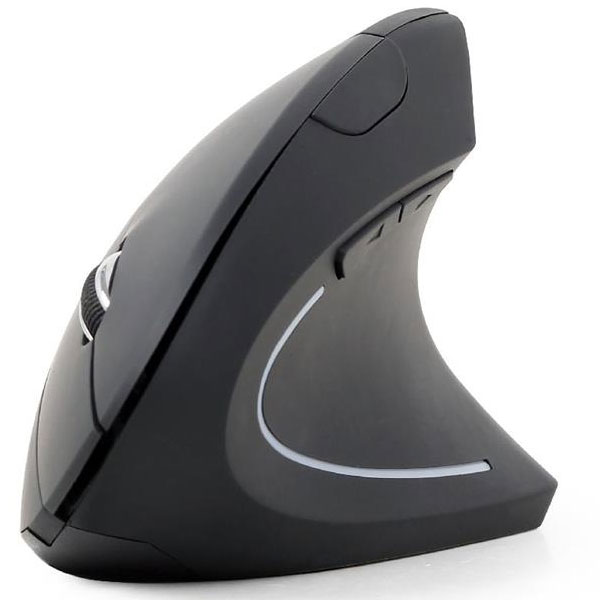
An ergonomic mouse can ensure a more relaxed posture. A mouse pad with a wrist rest provides extra support while working.
View our keyboards, mice, and mouse pads. Compare the features and choose a model that suits your computer, workspace, and usage.
A keyboard and mouse for every workstation
A keyboard and mouse form the basis of a computer workstation. You use them for work, school, the internet, and leisure. The right choice can make working faster and more pleasant.
There are many types of keyboards and mice. Some models are compact and simple. Others have extra keys or a shape that provides more support.
First, determine where you want to use the products. A desktop computer has different requirements than a laptop that you often take with you.
Choose wired or wireless
You connect a wired keyboard or wired mouse via USB. You do not need to charge or replace a battery. You also usually do not need to set up a wireless connection.
The disadvantage is the cable on your desk. In a small workspace, it can get in the way.
A wireless mouse or wireless keyboard offers more freedom. You have fewer cables and can easily move the device around. This often results in a tidier desk.
Wireless models connect via Bluetooth or a USB receiver. Check beforehand which connection the product uses. A USB receiver occupies a free USB port. Bluetooth does not require a separate receiver if your computer already supports it.
When choosing a wireless model, also pay attention to the power supply. Some devices use separate batteries. Others have a rechargeable battery.
What size keyboard do you need?
A standard keyboard has letters, function keys, arrow keys, and often a numeric keypad. The numeric keypad is useful if you work with numbers a lot.
A compact keyboard takes up less space. This leaves you with more room for your mouse. You can also place the mouse closer to your body.
Not every compact keyboard has a separate numeric keypad. Do you often use spreadsheets or enter a lot of amounts? Then a full keyboard might be more convenient.
Also pay attention to the layout of the keys. Check if the keyboard has the desired language layout. The position and shape of characters may vary depending on the layout.
A silent mouse for home or the office
Mouse clicks can be disruptive in a quiet room. A silent mouse makes less noise when clicking.
This is useful at the office, in a classroom, or while working from home. A quiet mouse can also be pleasant in the evening.
Please note that “silent” does not mean the mouse makes no sound. The buttons remain tactile and may still produce a soft sound.
A silent mouse often functions the same as a standard model. Therefore, you can also use it for daily work, browsing the internet, and studying.
What is an ergonomic mouse?
An ergonomic mouse has a shape that can provide more support to your hand and arm. The hand often rests in a different position than with a flat mouse.
This can be pleasant if you work many hours at the computer. However, the best shape varies from person to person. The size of your hand and your working style also play a role.
An ergonomic mouse does not automatically resolve all complaints. Your sitting posture and the height of your desk are also important. Additionally, take enough breaks and change your posture regularly.
Place the mouse close to the keyboard. This way, you don't have to move your arm as far to the side. Choose a sensitivity that allows you to move the pointer easily across the screen.
What is the purpose of extra mouse buttons?
A simple computer mouse has a left button, a right button, and a scroll wheel. Some models have extra buttons on the side.
You can use these buttons, for example, to go back and forward in a browser. This can save time when doing a lot of computer work.
Not every extra button works immediately in every program. Sometimes you need software to set up the function. Check this in the product information.
For simple use, two buttons and a scroll wheel are often enough. Do you work a lot with programs or large documents? Then extra buttons can be handy.
What does DPI mean for a mouse?
DPI indicates how fast the pointer moves. With a higher DPI, the pointer travels a greater distance when you move the mouse.
A high setting can be useful on a large screen. A lower setting provides more control for precise work.
Some mice have a button to adjust the DPI. You can then quickly switch between speed and accuracy.
A higher number does not always mean that the mouse is better. Above all, choose a setting that works comfortably on your screen.
Optical mouse or laser mouse
An optical mouse uses light to track movement. This type works well on most mouse pads and desks.
A laser mouse can work on more types of surfaces. However, its operation also depends on the color and texture of the desk.
Not all mice work well on glass. A mouse pad provides a firm surface in this case. It also protects the desk from wear and tear.
A mouse pad with wrist rest
A mouse pad provides a smooth surface. This allows the mouse to follow movements well.
Some mouse pads have a wrist rest made of gel or soft material. This provides support during short breaks. Choose a height that suits your mouse and hand.
Do not press your wrist hard against the support while moving. Try to keep your hand and arm in a straight, relaxed line as much as possible.
A mouse pad that is too small can restrict your movement. Therefore, choose a size that fits the available space and your way of working.
Complete your workplace
Do you often work on a laptop? A separate keyboard and mouse can provide more comfort. You can then position the screen higher and further away from you.
Place the keyboard directly in front of you. Keep your shoulders relaxed and position your forearms approximately level with the desk. Place the mouse as close as possible to the keyboard.
Do you use a full keyboard with a numeric keypad? Then the mouse is often positioned further to the right. A more compact model can help place the mouse closer.
No single posture is ideal all day long. Therefore, change your posture regularly. Stand up occasionally and give your hands a rest.
Which keyboard and mouse suit you?
For a fixed workstation, a wired set is simple and reliable. Do you want fewer cables? Then choose a wireless keyboard and a wireless mouse.
Do you work in a quiet room? Then take a look at a silent mouse. For more support, you can opt for an ergonomic model and a matching mouse pad.
When making your choice, pay attention to the connection, size, and number of keys. Also check if the keyboard has the correct layout. This way, you create a workspace that suits your daily use.