
Available on backorder – expected delivery Q1 2027.
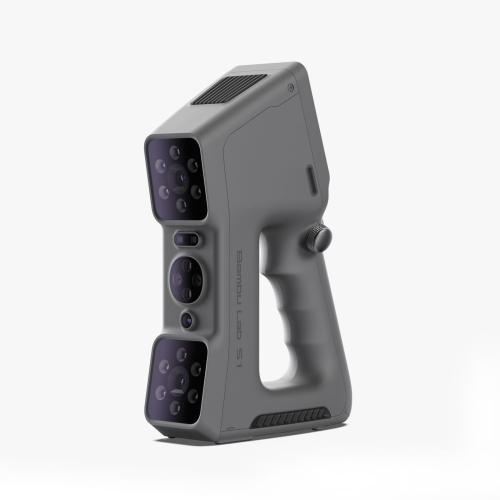
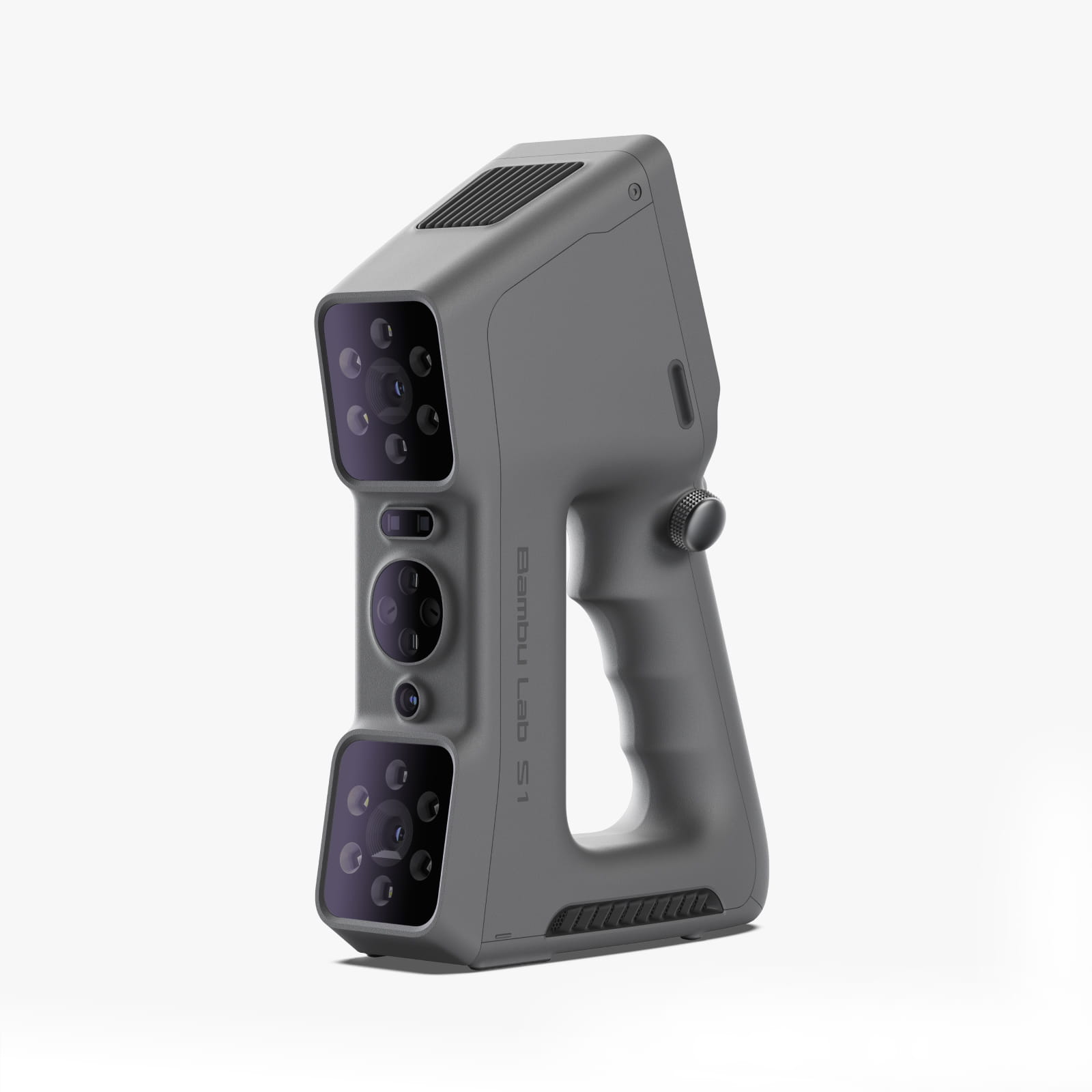
The Bambu Lab S1 is a wireless handheld 3D scanner for makers, engineers and workshops. Blue laser and infrared scanning capture the shape and colour of physical objects. The free Bambu Scan application processes the data on a suitable Windows PC with an Nvidia graphics card.
- Laser single-frame accuracy down to 0.02 mm under laboratory conditions.
- Four modes with up to 34 blue laser lines. Up to 90 fps with laser and 80 fps wirelessly.
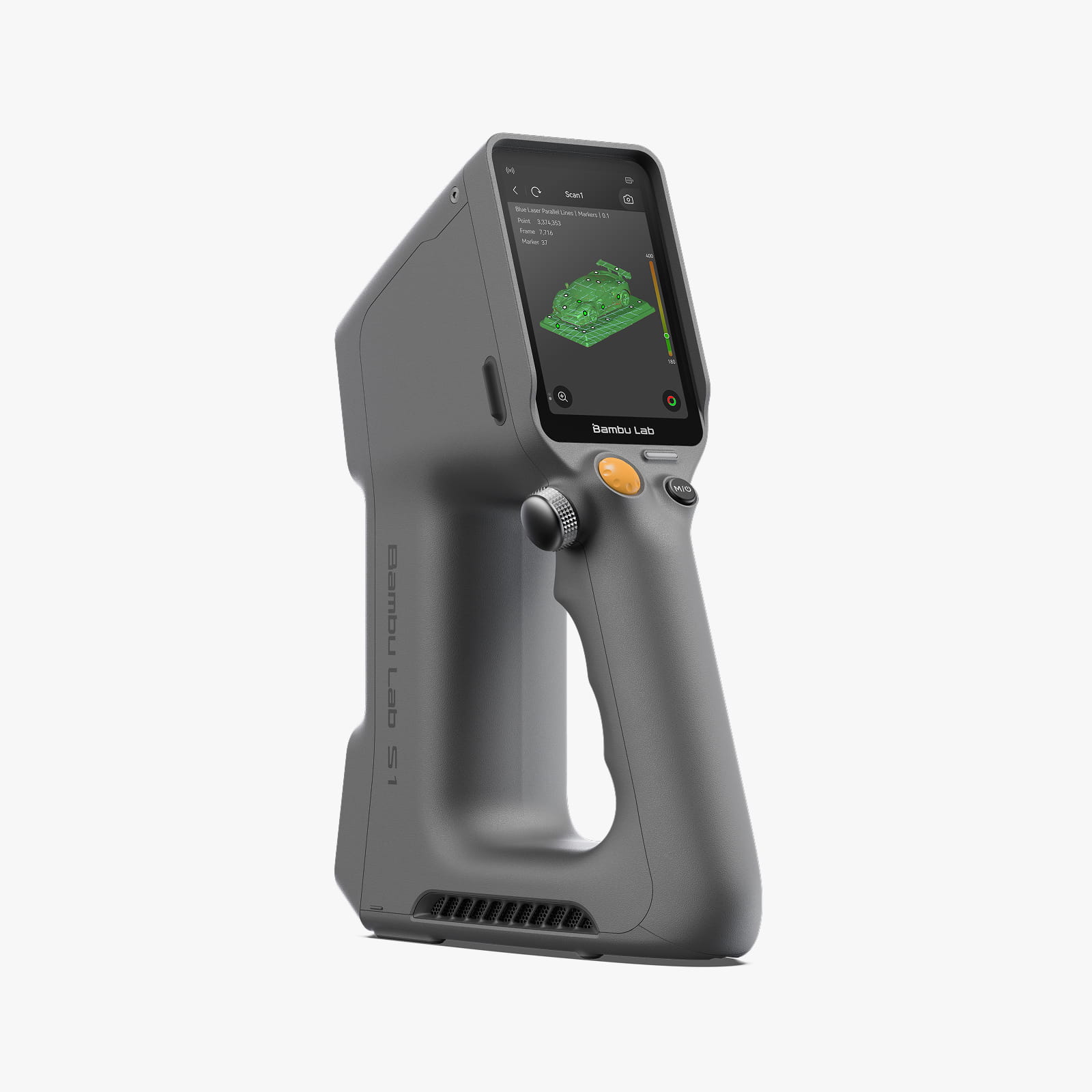
- Built-in 3.5-inch touchscreen, up to 3.5 hours of battery life and one-click transfer to Bambu Studio.
Bambu Lab S1 – from physical object to 3D model
A curved cover, worn relief or rounded mounting face can be difficult to draw from measurements alone. Capture the visible surface from different angles. Bambu Scan combines those views into a point cloud, from which you can build a mesh. Its triangles describe the surface for a new design, comparison or print.
For example, scan an enclosure before designing a bracket around it in CAD. This captures curved corners that are difficult to describe with callipers. Measure the fixing points separately and check the fit with a test print.
What the S1 brings to your workbench
Two light sources, a display and a battery share a 710 g body. Scan a loose component on your workbench or move around a larger object. All four modes support colour texture mapping, useful for a painted finish or a visible pattern. Choose the object type in Bambu Scan to get initial settings. A class can start with a common preset, while an experienced user can adjust parameters for a specific part.
Understanding 0.02 mm accuracy
Single-frame accuracy describes the deviation in one capture. Bambu Lab specifies up to 0.02 mm for blue laser and 0.06 mm for infrared in laboratory tests. A complete model combines many frames. Blue laser volumetric accuracy is 0.02 mm + 0.06 mm per metre, equivalent to 0.08 mm across one metre under test conditions. The infrared figure is 0.06 mm + 0.10 mm per metre. Lighting, the surface and your movement influence results.
Point spacing describes how closely the measured points sit together. Seven parallel lines provide 0.05 mm spacing. Crossed lines and single-line mode give 0.10 mm. A close spacing describes edges in finer detail. When specifying a fit, also account for measurement uncertainty and the tolerances of the eventual print.
Four scanning modes
34 crossed blue lines for wide surfaces
Choose the crossed pattern for a door panel, furniture component or large housing. It covers a wide area and helps build the overall shape quickly. Look at the screen to identify gaps. Bambu specifies up to 1,836,000 points per second at a working distance of 180–600 mm.
7 parallel blue lines for fine detail
Choose parallel lines for ribs, edges or shallow relief, for example on a wheel hub or carved ornament. Work 180–400 mm from the surface. This mode has the closest point spacing when you need to resolve two neighbouring edges.
Single blue line for recesses
Aim the single line into a groove or a visible screw hole. Change the viewing angle to capture its walls. Only surfaces reachable by both projected light and the camera can be measured. An enclosed cavity or hidden passage calls for another measuring method.
Infrared for people and larger shapes
Infrared structured light captures up to 2,880,000 points per second. A working distance of up to one metre leaves room around a bust or other large organic shape. Bambu directs users to infrared for people and to the Face preset when scanning someone’s face.
Wireless scanning with Wi-Fi 6
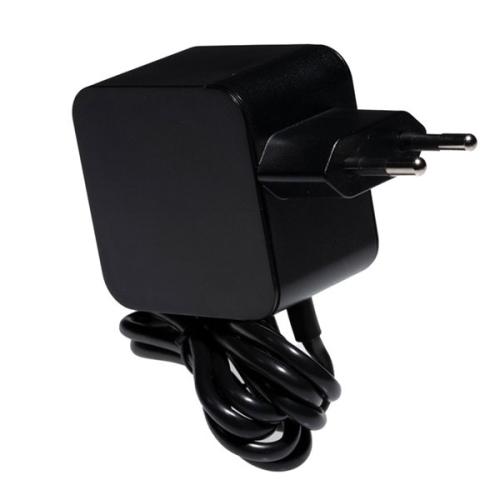
The battery uses two 4,800 mAh cells and provides up to 3.5 hours of use. A full charge takes about 1.5 hours with the supplied 60 W charger. Walk around the workpiece without trailing a cable around the table. The PC processes the data during the scan. It also needs Wi-Fi 6 for wireless scanning. Use a suitable adapter or connect by cable if required. Wireless capture reaches up to 80 fps.
A 3.5-inch touchscreen in your hand
See which surfaces you have captured while you move. Change modes or parameters without walking back to the computer. For example, you can stand beside a car panel while your monitor stays on the workbench. The screen gives you local control while the computer handles processing.
Watch the official Bambu Lab S1 introduction
Free Bambu Scan software
Choose from 14 presets. Small Parts is intended for small technical components, Automotive Parts for items such as doors and bumpers. Other profiles cover art and glossy black surfaces. If you are unsure, answer questions about the object to get a suggested light source and settings. Connect your S1 to use all eight advanced editing tools. Access to some tools is limited when the scanner is disconnected.
- Sculpt reshapes or smooths local areas of the mesh.
- Quick Measurement reads dimensions from a point cloud, mesh or cross-section.
- Add Reference Model imports a model for comparison.
- 3D Deviation Heatmap highlights local differences in colour.
- Coordinate Alignment sets up the axes for your scanned part.
- Create Feature defines references such as planes, circles and lines.
- Feature Fit fits geometric shapes to measured points, for example a cylinder to a bore.
- Feature Measurement analyses dimensions and geometric tolerances.
From a scan to a print with Bambu Studio
- Choose a preset, support the part securely and identify the surfaces you need.
- Move around it with overlapping views. Check coverage and capture missing areas.
- Process the cloud in Bambu Scan and check for holes, loose fragments and background geometry.
- Verify dimensions. Rebuild critical holes, threads or fits in CAD where needed.
- Send the model to Bambu Studio in one click. Choose orientation, material and supports, then check the layer preview.
To evaluate one prototype, start with a print-ready file. The scan supplies the geometry. Wall thickness, material and clearance still depend on your design. A short test section can often reveal a fit issue before you print the entire component.
Applications for the S1
For reverse engineering, use an existing part as a spatial reference. If only the left half of a cover survives, mirror it in CAD and design new fixings. In product development, scan a housing or motor to work out the space available for a new component. Start with a cross-section to check the fit.
In a workshop, record a component before modifying it. For quality control, align a scanned prototype with a reference model. The deviation map shows where a wall sits inside or outside the expected surface. Check critical dimensions with an additional measurement suited to the tolerance.
Artists can preserve successive versions of a sculpture. In restoration, use an intact ornament to reconstruct a missing counterpart. Students can scan a handmade model, change a detail and compare the next print with the original. One scanner can demonstrate several stages of the design process.
Who is the Bambu Lab S1 for?
The S1 suits makers, advanced hobbyists, engineers, businesses and schools that want to reuse physical shapes. Decide whether you need to reproduce, design or measure. Preparing an organic sculpture takes different work from designing a dimension-critical spare part. Check your computer before ordering.
System requirements
Bambu Scan runs on Windows at launch. Bambu has announced macOS support. The Apple requirements apply when that version becomes available.
| Component | Minimum | Recommended |
|---|---|---|
| Windows | Windows 10/11, 64-bit | Windows 10/11, 64-bit |
| Processor | Intel Core i7 (7th gen.) / AMD Ryzen 7 | Intel Core i7 (13th gen.) / AMD Ryzen 9 |
| RAM | 16 GB | 32 GB |
| Graphics | Nvidia 2060+, 6 GB VRAM | Nvidia 3060+, 8 GB VRAM |
| Apple, once released | M1+, macOS 12+, 16 GB | M3+, macOS 14+, 32 GB |
Box contents and accessories
Bambu confirms the S1 scanner with built-in battery and the supplied 60 W charger. The manufacturer describes calibration with a glass board. The full EU packing list has yet to be confirmed. The electric turntable and Wi-Fi 6 adapter are separate accessories.
Order your Bambu Lab S1
Electronics For You is an official Bambu Lab reseller with a showroom in Leusden, the Netherlands. We advise individuals, schools and businesses on 3D printing. Collection is possible once your order is ready. Shipping charges and free delivery
Compare our Bambu Lab 3D printers. printer selection guide: P3C Combo, H3C Combo. Contact our team.depend on the destination and our shipping terms. Place your backorder now for expected delivery in Q1 2027.
Bambu Lab S1 3D Scanner
SKU: BAMB1036
- Order before 4:00 PM = shipped today
- Free shipping from €99.95
- 14 days free returns
- Same-day pickup at our office in Leusden
Available on backorder – expected delivery Q1 2027.
The Bambu Lab S1 is a wireless handheld 3D scanner for makers, engineers and workshops. Blue laser and infrared scanning capture the shape and colour of physical objects. The free Bambu Scan application processes the data on a suitable Windows PC with an Nvidia graphics card.
- Laser single-frame accuracy down to 0.02 mm under laboratory conditions.
- Four modes with up to 34 blue laser lines. Up to 90 fps with laser and 80 fps wirelessly.
- Built-in 3.5-inch touchscreen, up to 3.5 hours of battery life and one-click transfer to Bambu Studio.
Bambu Lab S1 – from physical object to 3D model
A curved cover, worn relief or rounded mounting face can be difficult to draw from measurements alone. Capture the visible surface from different angles. Bambu Scan combines those views into a point cloud, from which you can build a mesh. Its triangles describe the surface for a new design, comparison or print.
For example, scan an enclosure before designing a bracket around it in CAD. This captures curved corners that are difficult to describe with callipers. Measure the fixing points separately and check the fit with a test print.
What the S1 brings to your workbench
Two light sources, a display and a battery share a 710 g body. Scan a loose component on your workbench or move around a larger object. All four modes support colour texture mapping, useful for a painted finish or a visible pattern. Choose the object type in Bambu Scan to get initial settings. A class can start with a common preset, while an experienced user can adjust parameters for a specific part.
Understanding 0.02 mm accuracy
Single-frame accuracy describes the deviation in one capture. Bambu Lab specifies up to 0.02 mm for blue laser and 0.06 mm for infrared in laboratory tests. A complete model combines many frames. Blue laser volumetric accuracy is 0.02 mm + 0.06 mm per metre, equivalent to 0.08 mm across one metre under test conditions. The infrared figure is 0.06 mm + 0.10 mm per metre. Lighting, the surface and your movement influence results.
Point spacing describes how closely the measured points sit together. Seven parallel lines provide 0.05 mm spacing. Crossed lines and single-line mode give 0.10 mm. A close spacing describes edges in finer detail. When specifying a fit, also account for measurement uncertainty and the tolerances of the eventual print.
Four scanning modes
34 crossed blue lines for wide surfaces
Choose the crossed pattern for a door panel, furniture component or large housing. It covers a wide area and helps build the overall shape quickly. Look at the screen to identify gaps. Bambu specifies up to 1,836,000 points per second at a working distance of 180–600 mm.
7 parallel blue lines for fine detail
Choose parallel lines for ribs, edges or shallow relief, for example on a wheel hub or carved ornament. Work 180–400 mm from the surface. This mode has the closest point spacing when you need to resolve two neighbouring edges.
Single blue line for recesses
Aim the single line into a groove or a visible screw hole. Change the viewing angle to capture its walls. Only surfaces reachable by both projected light and the camera can be measured. An enclosed cavity or hidden passage calls for another measuring method.
Infrared for people and larger shapes
Infrared structured light captures up to 2,880,000 points per second. A working distance of up to one metre leaves room around a bust or other large organic shape. Bambu directs users to infrared for people and to the Face preset when scanning someone’s face.
Wireless scanning with Wi-Fi 6
The battery uses two 4,800 mAh cells and provides up to 3.5 hours of use. A full charge takes about 1.5 hours with the supplied 60 W charger. Walk around the workpiece without trailing a cable around the table. The PC processes the data during the scan. It also needs Wi-Fi 6 for wireless scanning. Use a suitable adapter or connect by cable if required. Wireless capture reaches up to 80 fps.
A 3.5-inch touchscreen in your hand
See which surfaces you have captured while you move. Change modes or parameters without walking back to the computer. For example, you can stand beside a car panel while your monitor stays on the workbench. The screen gives you local control while the computer handles processing.
Watch the official Bambu Lab S1 introduction
Free Bambu Scan software
Choose from 14 presets. Small Parts is intended for small technical components, Automotive Parts for items such as doors and bumpers. Other profiles cover art and glossy black surfaces. If you are unsure, answer questions about the object to get a suggested light source and settings. Connect your S1 to use all eight advanced editing tools. Access to some tools is limited when the scanner is disconnected.
- Sculpt reshapes or smooths local areas of the mesh.
- Quick Measurement reads dimensions from a point cloud, mesh or cross-section.
- Add Reference Model imports a model for comparison.
- 3D Deviation Heatmap highlights local differences in colour.
- Coordinate Alignment sets up the axes for your scanned part.
- Create Feature defines references such as planes, circles and lines.
- Feature Fit fits geometric shapes to measured points, for example a cylinder to a bore.
- Feature Measurement analyses dimensions and geometric tolerances.
From a scan to a print with Bambu Studio
- Choose a preset, support the part securely and identify the surfaces you need.
- Move around it with overlapping views. Check coverage and capture missing areas.
- Process the cloud in Bambu Scan and check for holes, loose fragments and background geometry.
- Verify dimensions. Rebuild critical holes, threads or fits in CAD where needed.
- Send the model to Bambu Studio in one click. Choose orientation, material and supports, then check the layer preview.
To evaluate one prototype, start with a print-ready file. The scan supplies the geometry. Wall thickness, material and clearance still depend on your design. A short test section can often reveal a fit issue before you print the entire component.
Applications for the S1
For reverse engineering, use an existing part as a spatial reference. If only the left half of a cover survives, mirror it in CAD and design new fixings. In product development, scan a housing or motor to work out the space available for a new component. Start with a cross-section to check the fit.
In a workshop, record a component before modifying it. For quality control, align a scanned prototype with a reference model. The deviation map shows where a wall sits inside or outside the expected surface. Check critical dimensions with an additional measurement suited to the tolerance.
Artists can preserve successive versions of a sculpture. In restoration, use an intact ornament to reconstruct a missing counterpart. Students can scan a handmade model, change a detail and compare the next print with the original. One scanner can demonstrate several stages of the design process.
Who is the Bambu Lab S1 for?
The S1 suits makers, advanced hobbyists, engineers, businesses and schools that want to reuse physical shapes. Decide whether you need to reproduce, design or measure. Preparing an organic sculpture takes different work from designing a dimension-critical spare part. Check your computer before ordering.
System requirements
Bambu Scan runs on Windows at launch. Bambu has announced macOS support. The Apple requirements apply when that version becomes available.
| Component | Minimum | Recommended |
|---|---|---|
| Windows | Windows 10/11, 64-bit | Windows 10/11, 64-bit |
| Processor | Intel Core i7 (7th gen.) / AMD Ryzen 7 | Intel Core i7 (13th gen.) / AMD Ryzen 9 |
| RAM | 16 GB | 32 GB |
| Graphics | Nvidia 2060+, 6 GB VRAM | Nvidia 3060+, 8 GB VRAM |
| Apple, once released | M1+, macOS 12+, 16 GB | M3+, macOS 14+, 32 GB |
Box contents and accessories
Bambu confirms the S1 scanner with built-in battery and the supplied 60 W charger. The manufacturer describes calibration with a glass board. The full EU packing list has yet to be confirmed. The electric turntable and Wi-Fi 6 adapter are separate accessories.
Order your Bambu Lab S1
Electronics For You is an official Bambu Lab reseller with a showroom in Leusden, the Netherlands. We advise individuals, schools and businesses on 3D printing. Collection is possible once your order is ready. Shipping charges and free delivery
Compare our Bambu Lab 3D printers. printer selection guide: P3C Combo, H3C Combo. Contact our team.depend on the destination and our shipping terms. Place your backorder now for expected delivery in Q1 2027.