
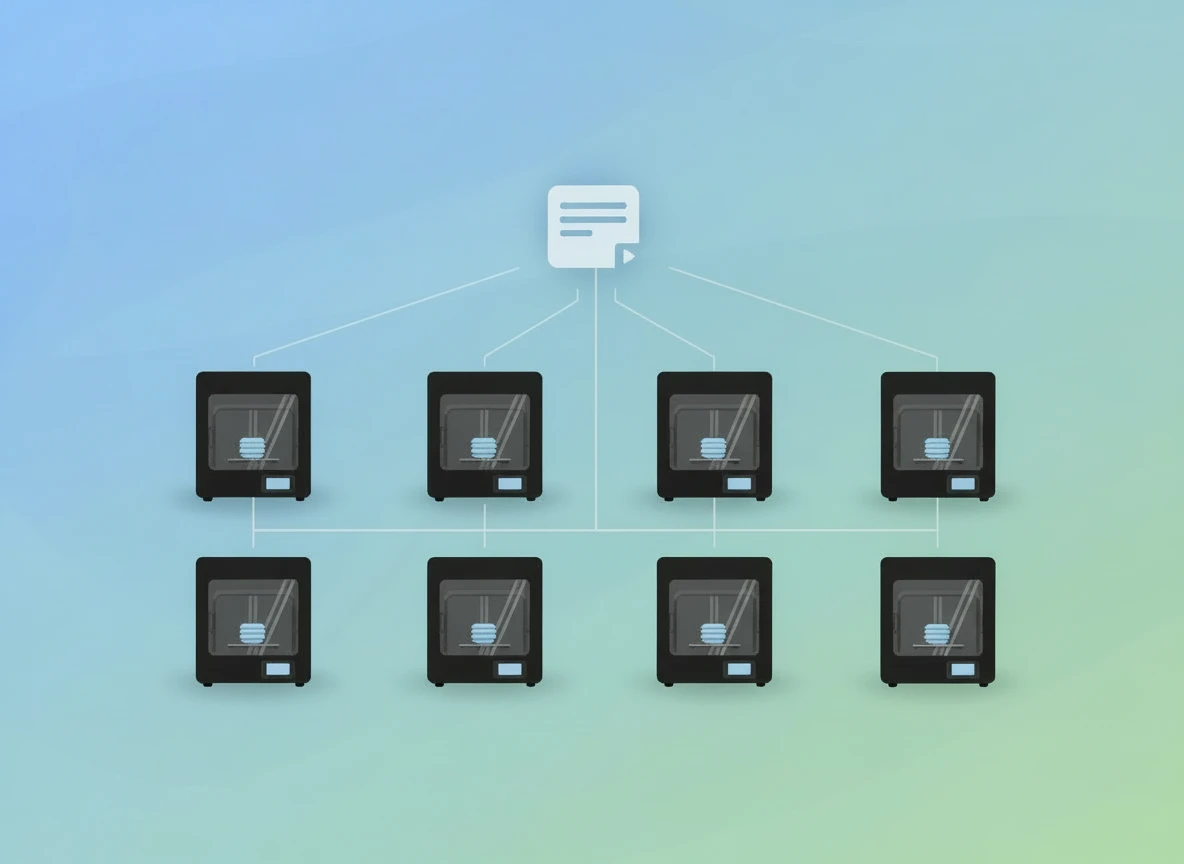
Bambu Farm Manager: must-have or redundant?
Bambu Farm Manager is a tool for managing a print farm with multiple Bambu printers. You use Bambu Studio for slicing, and Farm Manager for scheduling print jobs, queuing them, and controlled launching. In this article, you will learn what it is, when it is useful, how to get started, and which pitfalls you encounter most often.
What is Bambu Farm Manager?
Bambu Farm Manager is software that allows you to centrally manage multiple Bambu Lab 3D printers. Instead of starting a print for each printer individually in Bambu Studio, you work with a server and a client. With this, you create print jobs, place them in a queue, and start them whenever it suits you.
You see in a single overview which printers are busy, which tasks are still waiting, and who started which print. That is exactly what you miss when you work with multiple printers and start everything “separately” from Bambu Studio.
Farm Manager is primarily designed for repeat prints and multiple printers. If you usually start a single print on one printer, it quickly feels like extra steps. But as soon as you have multiple printers, or work with multiple people, it actually saves time.
Who is it for?
Bambu Farm Manager is useful if you:
have multiple printers
often print the same parts
works with multiple users
want an overview of tasks, batches, and staffing
Typical situations where Farm Manager actually makes sense
Think of a small print farm with 5–20 printers. Or a workspace where multiple people start prints. It is also useful in a school environment. You don't want everyone starting everything at the same time.
Why staggered starts can be important
When multiple printers warm up and start at the same time, you get a peak. That can be just too much for a group. With Farm Manager, you can schedule tasks and start them in a staggered manner. That provides peace of mind. And it prevents hassle.
When is it (even) less interesting?
Farm Manager is less interesting if you have 1–2 printers and mainly do single prints. In that case, printing directly from Bambu Studio is often faster.
In practice, Farm Manager makes the most sense for about 5 printers or more, or for multiple users. The permissions and roles are currently limited, but this can be improved later.
Bambu Farm Manager vs Bambu Studio: what is the difference?
Bambu Studio is your slicer. That is where you create your print file. You choose your printer, material, and settings. Then you send a print.
Farm Manager is responsible for the surrounding management. This involves:
- planning tasks
- create queues
- running batches
- control multiple printers simultaneously
- see who starts what
In short: Studio creates the file. Farm Manager manages the farm.
How do you use the Farm Manager?
Bambu Farm Manager consists of two parts.
- Server : runs on a PC/server that is preferably always on.
- Client : allows you to log in, upload files and create print jobs.
Think of it as one central place for your print farm. The server is the foundation. The client is what you use daily.
Practical tip: choose a fixed server
Install the server on a machine that is stable and always on. Preferably via cable. This prevents your farm from dropping due to Wi-Fi or a laptop closing.
Bambu Farm Manager Client setup (installation)
- Download the Bambu Farm Manager Client from the official website. Alternatively, you can also do so via: https://public-cdn.bblmw.com/upgrade/farm-manager/ bambu -farm-manager-client-v2.1.3-4fd131d3-win32-x64.exe
- Start the installer and install the program.
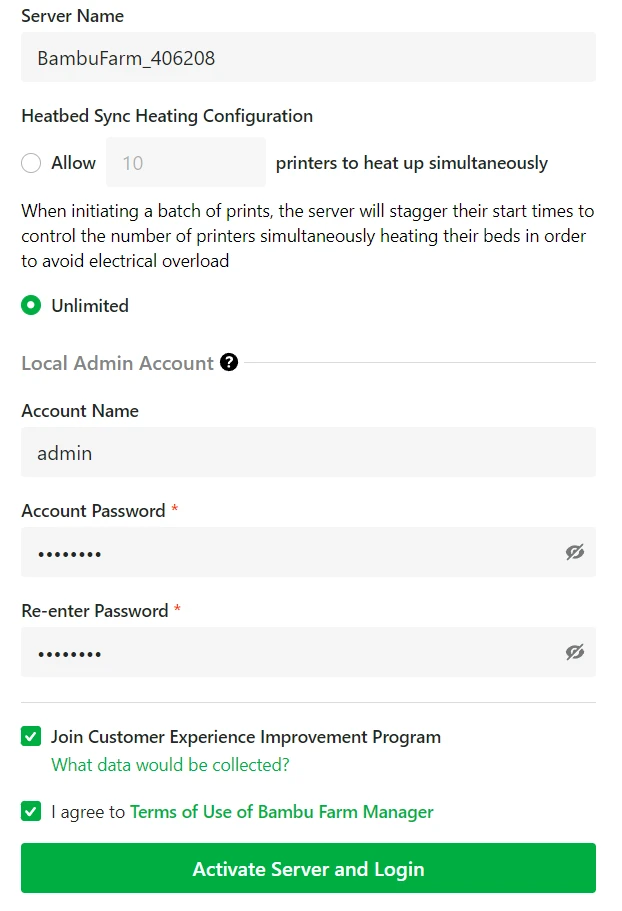
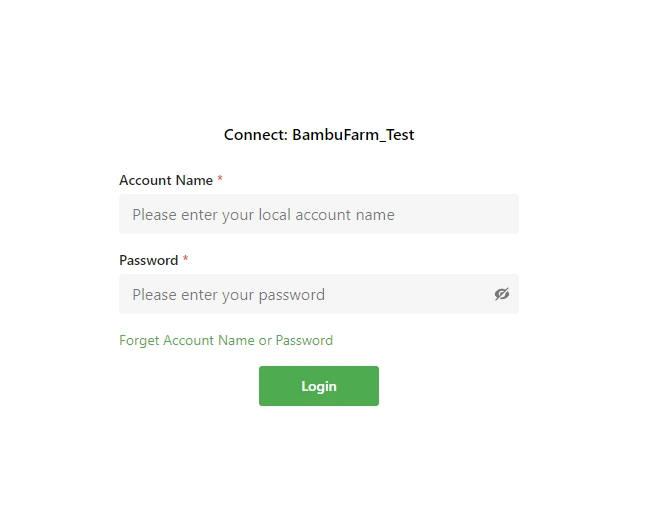
- Open the client and log in with your account details.
If the server is new and you are the first user, create the admin login. As admin, you can adjust settings and create accounts.
Accounts and roles (basic agreements)
Make simple agreements. That saves a lot of hassle later.
- Who is allowed to add or remove printers?
- Who is allowed to start tasks?
- Who is responsible for filament changes?
Connect printer
Connecting a printer only works properly if it is not already actively connected elsewhere.
Before you begin (checklist)
- The printer is on.
- The printer is on the same network as the server.
- You connect the correct printer.
Steps
- Ensure that the printer is not connected to the Bambu Handy app.
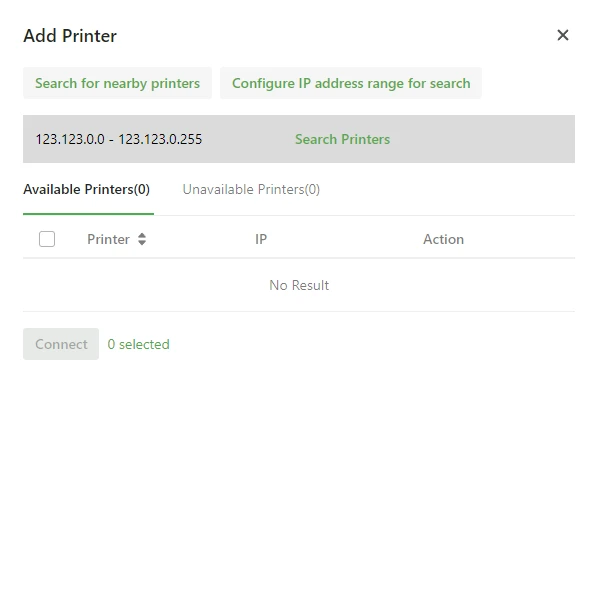
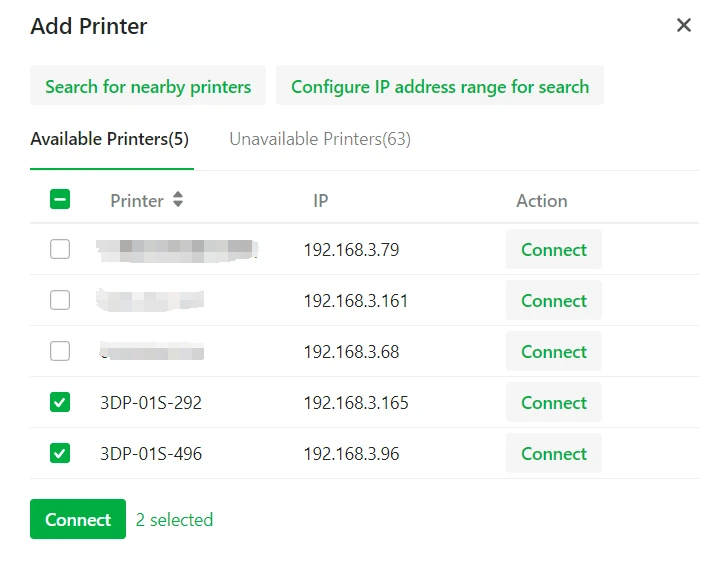
- In Farm Manager, click Add printer .
- Do you see the printer? Click Connect .

Printer not visible in Farm Manager
Can't you see the printer?
- Check if the printer is on the same network.
- Check the IP address on the printer: Settings > Wi-Fi.
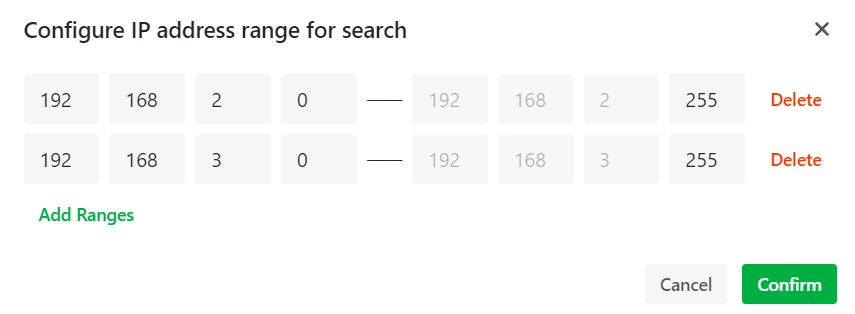
- Adjust the IP range in Farm Manager so that you scan the correct subnet.
Is it still not working?
- Check that you are not using a guest network.
- Check if your router has “client isolation” enabled.
- Check firewall/VLAN settings.
Printer is still linked to Bambu Handy
This is a common cause. Disconnect the printer in Bambu Handy. Log out if necessary. Then try again.
Is Bambu Studio still working?
Usually yes. But agree on how you work. Otherwise, someone starts a print from Studio while you have a queue ready. That causes confusion.
Upload file
Farm Manager works with sliced print files. First, slice your model in Bambu Studio using the correct printer and material.
Be careful when slicing
This is where things often go wrong.
- Choose the correct printer (for example P1S vs X1C).
- Choose the right filament profile.
- Check support and layer height.
Upload
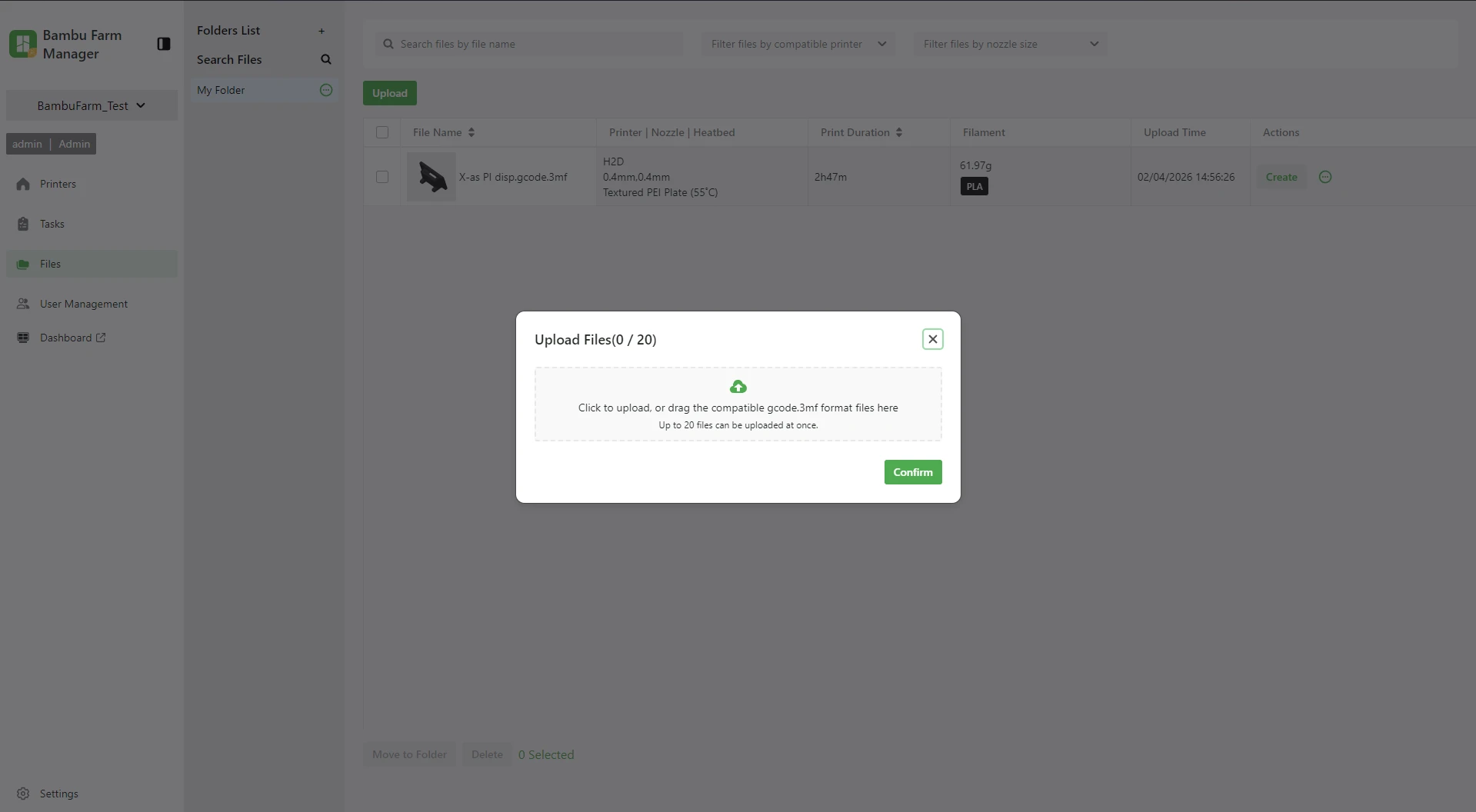
Go to Files and click Upload. Drag your file in or select it via Explorer. It will then appear in the list.
Tip: use clear file names. For example:
- product + version
- material
- colour
- nozzle/layer height
That makes repeat prints much easier.
Create print job (issue command)
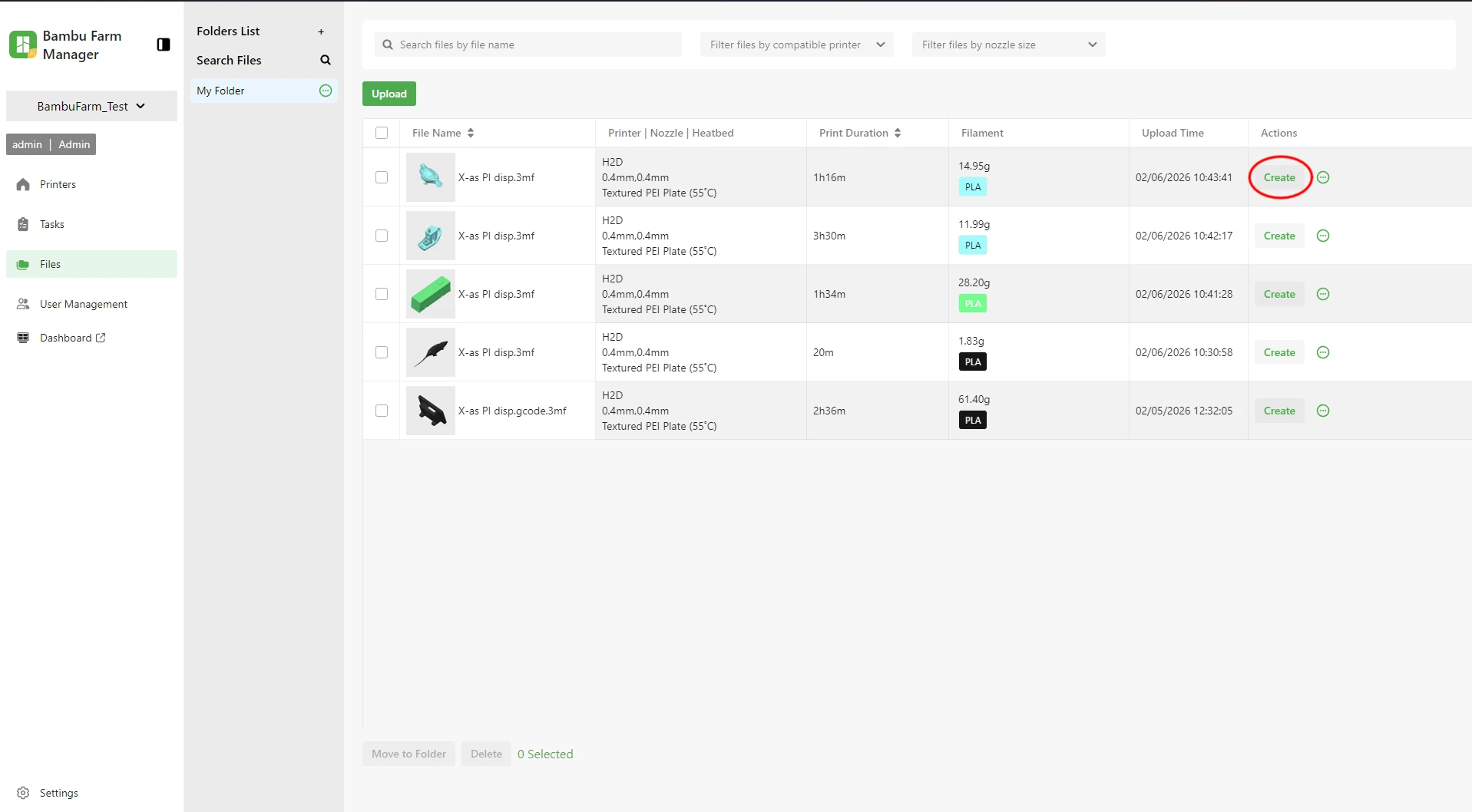
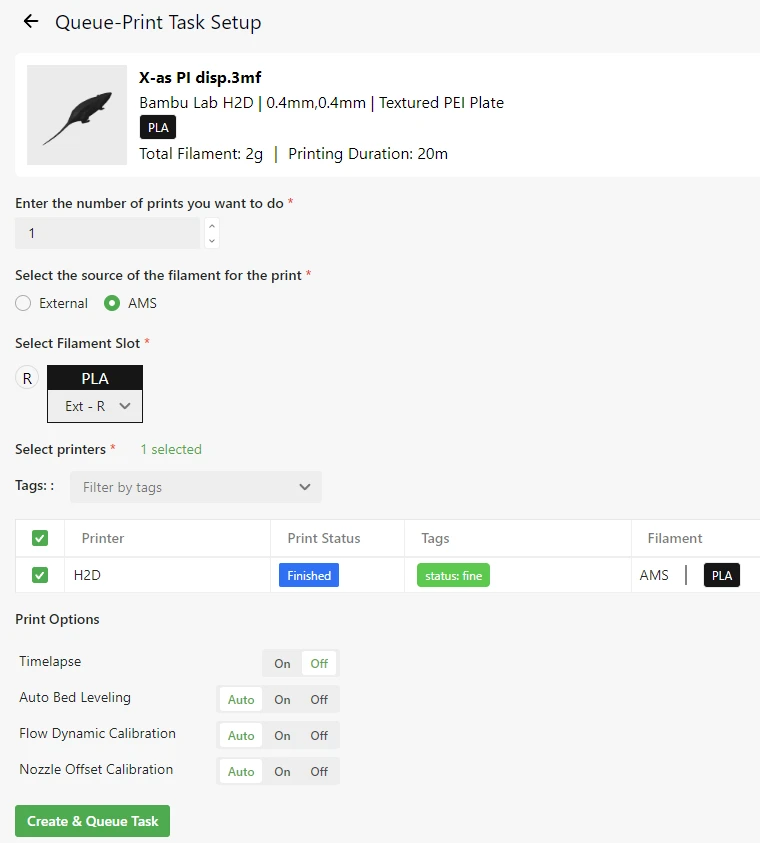
Once your file has been uploaded, create a print job via Create.
Direct-print task
This starts immediately. It is convenient for a quick test. It is less convenient for repetitive work.
Queue print task
This puts your task in the queue. You start later whenever you want. For print farms, this is usually the best option.
Selecting printers and planning quantities
Select which printers are allowed to perform the task. Do you want more items than you have printers? Then start the next round afterwards.
A simple approach:
- create one task with the correct number
- start on the printers that are free
- Start the next one as soon as a printer is finished.
Filament mismatch: why doesn't the task start?
This is a classic.
- The printer only starts if the correct filament (type/color) is selected.
- Are you changing your filament? Adjust it in the printer as well.
- Are you working with multiple positions? Make sure it matches with your slicer.
If this doesn't match, a task often gets stuck.
Start printing
If printers are ready and there is a task in the queue, you will find it in Ready to start. Click Start.
Printer is not listed in Ready to start
Usually, this is the cause:
- The printer is not idle.
- printer is not properly connected
- filament does not match
- The task has been sliced for another model
Work with a fixed routine: first coupling, then filament, then task.
Using Bambu Farm Manager remotely (remote access) – what are the risks?
It is technically possible to access Farm Manager from another network. However, this is not recommended if you do not know exactly what you are doing.
As soon as you open ports, you make a service accessible from the internet. This entails risks. You are then responsible for security and updates yourself.
If you do this anyway, 8888 (HTTPS) or 1883 (MQTT) are often mentioned. Only do this if your network security is in order.
Advantages and disadvantages
Farm Manager gives you control. But it also adds steps.
Advantages
- You centrally control multiple printers.
- Mass prints become clear.
- You plan quantities and batches.
- You can quickly see which printer is busy and where tasks are getting stuck.
- It is Bambu proprietary software, so the chance of good support is high.
Disadvantages
- It is still under development. It can sometimes work sluggishly.
- There is still little supporting information.
- It works (for now) only with Bambu Lab.
- For individual prints, Bambu Studio is often faster.
Still in beta
Farm Manager is still under development and only works with certain firmware versions. In your current text, you mention, among other things:
- P1P/P1S: V01.06.20.20 or newer
- A1/A1 mini: V01.03.20.20 or newer
- X1C: V01.09.00.00 or newer
- X1E: V01.01.03.12 or newer
- H2D: V01.02.00.00 or newer
- H2D Pro: V01.01.00.00 or newer
Always check this against the current Bambu documentation. Versions change.
Future expectations
Farm Manager is currently mainly useful for repeat prints and multiple printers. But it stands to reason that it will grow.
Consider:
- better roles and rights
- restrictions per user
- better planning and automation
- safer options for remote work
FAQ: frequently asked questions and troubleshooting
Do I need Farm Manager with 1–2 printers?
Usually not. Bambu Studio is faster then. Farm Manager only becomes really useful with multiple printers or multiple users.
Can I use Farm Manager and Bambu Studio at the same time?
Often yes. But make arrangements. Otherwise, someone will start from the Studio while you set up a queue.
Why doesn't Farm Manager see my printer?
Check the network, IP range, and whether you are using a guest network. Also check “client isolation” on your router.
Why won't my task start?
Filament information is usually incorrect. Check the type, color, and position. And check if the printer is idle.
Is using externally (remotely) safe?
Only if you know what you are doing. Opening ports involves risks. For most setups, working locally is the best choice.
Does Farm Manager work with other brands of printers?
Not for the time being. It is aimed at Bambu Lab.
Conclusion
Do you have multiple printers or multiple users? Then Bambu Farm Manager is a logical step. You gain overview, planning, and control. Do you have one or two printers and mainly start individual prints? Then printing directly from Bambu Studio is usually the easiest choice.
Farm Manager will likely become more valuable as it grows further out of beta and more features become available that are truly intended for print farms.