

Bambu Lab P2S Combo versus X2D Combo: Der vollständige Unterschied
Der Bambu Lab P2S Combo kostet 837,95 €, der X2D Combo 949 €. Das entspricht einer Differenz von 111 €. Die beiden Drucker unterscheiden sich jedoch deutlich stärker, als dieser Betrag vermuten lässt. Der Preisunterschied liegt nicht nur in der Hardware. Er zeigt sich auch im Druckverhalten, den gedruckten Objekten und dem Filamentverbrauch.
Beide Drucker gehören zur CoreXY-Klasse. Beide sind schnell und präzise. Wer noch unentschlossen ist, liegt genau darin das Problem: Sie sehen sich ähnlich. Doch die Wahl hat weitreichende Konsequenzen für den täglichen Gebrauch.
Dieser Artikel erklärt alle Unterschiede. Sie erfahren, welcher Drucker für welchen Anwendungsbereich besser geeignet ist. Am Ende wissen Sie genau, welche Wahl Sie treffen sollten.
| Spezifikation | P2S Combo | X2D Combo |
| Preis | 837,95 € | 949 € |
| Düsen | 1 | 2 (Haupt- + Hilfshaupt) |
| Bauvolumen (1 Düse) | 256 × 256 × 256 mm | 256 × 256 × 260 mm |
| Bauvolumen (Doppeldüse) | — | 235,5 × 256 × 256 mm |
| Maximale Düsentemperatur | 300 °C | 300 °C |
| Maximale Betttemperatur | 110 °C | 120 °C |
| Raumheizung | bis zu 50 °C | bis zu 65 °C |
| Luftfiltration | Kohlefilter | G3 + H12 HEPA + Kohlenstoff |
| UL 2904-zertifiziert | NEIN | Ja |
| Sensoren | 20 | 31 |
| Bildcodierer | NEIN | Optional |
| AMS enthalten | AMS 2 Pro | AMS 2 Pro |
Größte Unterschiede zwischen P2S und X2D
Der größte Unterschied liegt in der Anzahl der Düsen. Die P2S hat eine Düse, die X2D zwei. Das mag wie ein kleines Detail erscheinen, ist es aber nicht.
Mit einer einzelnen Düse drucken Sie jeweils nur ein Material. Möchten Sie mehrere Farben drucken? Dann verwenden Sie ein AMS (Automatisches Materialsystem). Es wechselt das Filament automatisch. Bei jedem Wechsel spült der Drucker jedoch eine kleine Menge Filament aus. Dies nennt man Spülvorgang. Bei häufigen Farbwechseln summiert sich das schnell.
Der X2D verfügt über eine Hauptdüse und eine Hilfsdüse. Die Hauptdüse druckt das Modell, die Hilfsdüse das Stützmaterial. Beide arbeiten unabhängig voneinander. Beim Wechsel zwischen Modell- und Stützmaterialdruck ist kein Spülvorgang erforderlich. Das spart Filament und Zeit.

Das Bauvolumen hängt von der Nutzung des X2D ab. Der P2S druckt bis zu 256 × 256 × 256 mm. Mit nur der Hauptdüse erreicht der X2D 256 × 256 × 260 mm. Werden beide Düsen gleichzeitig verwendet? Dann reduziert sich das nutzbare Volumen auf 235,5 × 256 × 256 mm. Die zweite Düse benötigt Platz an der Seite des Druckkopfes. Das ergibt einen Unterschied von etwa 20 mm in der Breite. Bei den meisten Drucken ist dies nicht wahrnehmbar. Bei breiten Modellen sollte dies jedoch berücksichtigt werden.
Beide Drucker nutzen das CoreXY-Bewegungssystem. Dieses System bewegt den Druckkopf schnell in X- und Y-Richtung. Das Druckbett bewegt sich nur in Z-Richtung. Dadurch werden hohe Geschwindigkeiten bei geringeren Vibrationen ermöglicht.
Das P2S ist einfacher und günstiger. Das X2D ist effizienter für Arbeiten mit verschiedenen Materialien und Stützstrukturen. Das ist der Kern des Unterschieds.
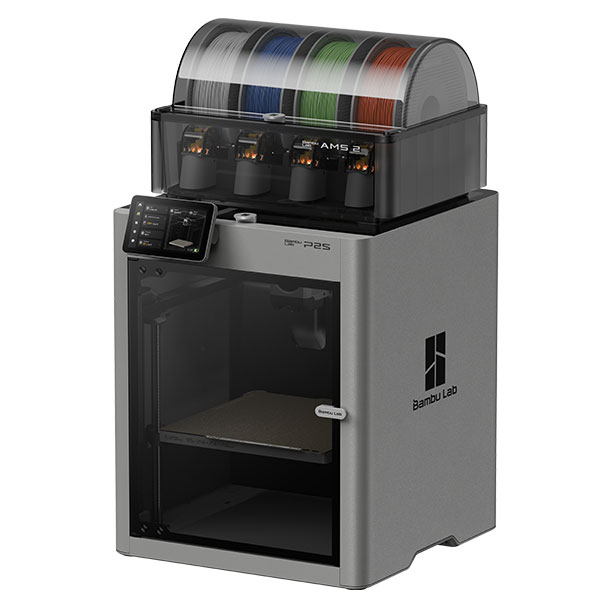
Die Combo-Versionen beider Drucker werden standardmäßig mit einem AMS 2 Pro geliefert. Beide sind auch separat ohne AMS erhältlich. Mit einem AMS können Sie bis zu vier Spulen anschließen. Beim P2S verwenden Sie das AMS für alle Mehrfarbendrucke. Beim X2D verwenden Sie das AMS für Drucke mit mehr als zwei Farben. Für Drucke mit zwei Materialien, wie z. B. Modell und Stützstruktur, benötigen Sie beim X2D kein AMS.


Druckqualität und Leistung des P2S und X2D
Beide Drucker sind schnell. Der P2S erreicht eine maximale Geschwindigkeit von 600 mm/s. Die Beschleunigung beträgt 20.000 mm/s². In der Praxis druckt man für beste Qualität mit 200–350 mm/s. Bei dieser Geschwindigkeit erzielt man eine glatte Oberfläche und scharfe Details.
Beide Drucker verfügen über einen PMSM-Servo-Extruder. PMSM steht für Permanentmagnet-Synchronmotor. Er misst den Filamentvorschub 20.000 Mal pro Sekunde. Dadurch werden Druckschwankungen an der Düse schneller erkannt und korrigiert. Dies macht sich bei feinen Details und bei nassem oder abgenutztem Filament bemerkbar.
Warum ist das wichtig? Filament ist nie perfekt. Sein Durchmesser variiert leicht. Manchmal nimmt es Feuchtigkeit auf. Bei einem Standardextruder bemerkt man das an kleinen Unregelmäßigkeiten. Der PMSM-Extruder korrigiert dies aktiv bei beiden Druckern.
Das Kühlsystem des X2D nutzt zwei Lufteinlässe. Die Luft strömt von zwei Seiten in das Modell. Dadurch wird es schneller und gleichmäßiger gekühlt. Überhänge und Brücken werden dadurch besser dargestellt. Der P2S verfügt über eine Standardkühlung. Diese funktioniert zwar gut, aber nicht auf diesem Niveau.
Beide Drucker verfügen über eine aktive Vibrationskompensation. Das sogenannte „Ringing“ ist das sichtbare Wellenmuster, das bei hohen Geschwindigkeiten auf der Oberfläche auftritt. Die aktive Vibrationskompensation reduziert dieses Muster deutlich. Beide Drucker messen ihre eigenen Vibrationen und passen die Bewegungen entsprechend an.
Der X2D verfügt über einen optionalen Vision Encoder. Dieser misst die Druckposition mit einer Genauigkeit von 50 Mikrometern. Es handelt sich um eine kostenpflichtige Erweiterung. Für technische Bauteile mit engen Toleranzen ist diese Genauigkeit von großem Wert. Der P2S besitzt diesen Sensor nicht.
Die P2S liefert bereits hervorragende Qualität. Die X2D geht noch einen Schritt weiter und eignet sich für Präzisionsarbeiten und technische Anwendungen.

Für Hobbybastler und Tüftler ist die Druckgeschwindigkeit des P2S mehr als ausreichend. Ein Standard-FDM-Modell lässt sich zwei- bis dreimal schneller drucken als mit einem günstigen Drucker. Darüber hinaus bietet der X2D zusätzliche Präzision. Dies macht sich allerdings nur bei anspruchsvollen Anwendungen bemerkbar.
Doppeldüse versus AMS bei P2S und X2D
Bei Mehrmaterialdrucken macht die Vorgehensweise einen großen Unterschied. Hier ist es hilfreich, beide Systeme getrennt zu betrachten.
Das automatische Filamentwechselsystem (AMS) wechselt das Filament automatisch. Bei jedem Farbwechsel spült der Drucker eine kleine Menge Material aus. Dies ist die Spülung. Sie ist notwendig, um Farbreste aus der Düse zu entfernen. Ohne Spülung würde die vorherige Farbe in der nächsten Schicht wieder sichtbar sein. Bei Modellen, die häufige Farbwechsel erfordern, sammelt sich Material an. Ein mehrfarbiger Druck mit acht Farben kann Dutzende von Spülvorgängen erfordern.
Der X2D arbeitet mit Modell und Stützmaterial anders. Die Hilfsdüse hält immer das Stützmaterial bereit. Die Hauptdüse enthält das Modelliermaterial. Ein Spülvorgang zwischen den beiden Düsen ist nicht erforderlich. Jedes Material befindet sich immer auf seiner eigenen Düse. Keine Kontamination, keine Wartezeit beim Materialwechsel.
Bambu Lab hat dies an drei Modellen getestet. Hier die Ergebnisse im Vergleich zum X1C mit AMS:
- Zodiac: 45,76 % weniger Material, 34,34 % schneller.
- TPU-Sneaker: 29,8 % weniger Material, 64,04 % schneller.
- Mittelstück für Jagdbogen: 41,47 % weniger Material, 33,87 % schneller.
Die Zeitersparnis ergibt sich aus weniger Bereinigungsblöcken. Weniger Bereinigungen bedeuten weniger Unterbrechungen. Dies ist besonders bei langen Druckvorgängen von Bedeutung. Ein zehnstündiger Druckvorgang verkürzt sich dadurch auf sieben Stunden.
Das Entfernen von Stützstrukturen ist beim X2D ebenfalls einfacher. Man kann wasserlösliches Material wie PVA verwenden. Dieses wird nach dem Drucken in Wasser aufgelöst. Die Stützstruktur verschwindet, ohne dass man sie mit einer Zange abziehen muss. Beim P2S ist dies über das AMS ebenfalls möglich. Allerdings muss man dann bei jedem Wechsel die Spülreste in Kauf nehmen.
Die Kombination aus TPU und PLA ist ebenfalls ein gutes Beispiel. TPU ist flexibel, PLA hingegen starr. Zusammen werden sie für Scharniere oder Softgrip-Elemente verwendet. Beim X2D lassen sie sich ohne Spülen austauschen. Beim P2S kostet jeder Austausch Zeit und Material.
Für Drucke mit mehr als zwei Farben benötigen Sie auch auf dem X2D ein AMS. Bei Modellen mit Stützmaterial ist der X2D jedoch deutlich effizienter.

Begleitmaterialien für P2S und X2D
Beide Drucker unterstützen eine breite Palette an Filamenten. Der P2S verarbeitet PLA, PETG, ABS, ASA, TPU, PET, PA, PC und PVA. Auch Varianten mit Kohlenstoff- und Glasfaserverstärkung sind möglich. Die Düse erreicht eine maximale Temperatur von 300 °C, das Druckbett bis zu 110 °C. Das ist für die meisten Hobby- und Maker-Anwendungen ausreichend.
Der X2D unterstützt dieselben Filamente. Bei technischen Werkstoffen bietet er jedoch noch mehr Möglichkeiten. Beide Drucker verfügen über eine aktive Kammerheizung. Der P2S heizt die Druckkammer auf 50 °C auf, der X2D erreicht 65 °C. Diese zusätzlichen 15 Grad machen bei anspruchsvollsten Materialien einen entscheidenden Unterschied.
ABS und ASA schrumpfen bei zu niedrigen Umgebungstemperaturen. Dadurch löst sich das Druckmaterial oder bricht. Beide Drucker verhindern dies durch Raumheizung. Bei großen oder dickwandigen Modellen liefert die höhere Temperatur des X2D jedoch zuverlässigere Ergebnisse.
Nylon absorbiert Feuchtigkeit und reagiert stark auf Temperaturschwankungen. Eine konstante Wärme sorgt für eine bessere Haftung zwischen den Schichten. Das X2D erreicht diesbezüglich bei 65 °C eine höhere Zuverlässigkeit als das P2S bei 50 °C.
PC, oder Polycarbonat, ist eines der robustesten Materialien für den 3D-Druck. Es zeichnet sich durch hohe Hitzebeständigkeit und Zähigkeit aus. Allerdings stellt es auch hohe Anforderungen an die Verarbeitung. Die maximale Betttemperatur des X2D beträgt 120 °C, die des P2S 110 °C. Dieser Unterschied von 10 Grad ist bei PC relevant.
Die Zusatzdüse der X2D eignet sich ideal für Stützfilamente. Denken Sie an PVA oder Bambu Support für PLA. Sie mischen es direkt mit dem Modelliermaterial. Keine Verunreinigungen, kein zusätzliches Spülen.
Drucken Sie hauptsächlich PLA und PETG? Dann sind beide Drucker hinsichtlich der Materialien vergleichbar. Arbeiten Sie mit Nylon, PC, ABS, ASA oder Kohlefaser? Dann bietet der X2D dank seiner aktiven Kammerheizung einen klaren Vorteil.

Intelligente Funktionen, KI und Luftqualität des P2S und X2D
Beide Drucker verfügen über eine 1080p-Live-View-Kamera und eine Werkzeugkopfkamera. Der Druckvorgang lässt sich über die Bambu Handy App oder Bambu Studio überwachen. Die Spaghetti-Erkennung stoppt den Druckvorgang, falls ein Fehler auftritt. Der Drucker erkennt, wenn Filament unkontrolliert in der Luft hängt, anstatt auf dem Modell zu landen.
Die Filamentüberwachung ist bei beiden Geräten verfügbar. Der Drucker meldet, wenn das Filament zur Neige geht. Er erkennt außerdem Verwicklungen und Unregelmäßigkeiten im Filamentvorschub. So wissen Sie frühzeitig, ob ein Problem auftritt.
Bis zu diesem Punkt sind sie vergleichbar. Danach nicht mehr.
Der X2D verfügt über eine Durchflussdynamik-Kalibrierung. Diese Kalibrierungsmethode basiert auf einem nichtlinearen Modell und kompensiert Verschleiß an der Düse und feuchtes Filament. Der Extruder weiß genau, wie viel Material durchfließt. Der Durchsatz wird kontinuierlich angepasst. Der P2S hat eine einfachere Kalibrierung. Beim Wechsel des Filamentstyps liefert der X2D konsistentere Ergebnisse.
Der X2D verfügt über 31 Sensoren, der P2S über 20. Mehr Sensoren ermöglichen einen besseren Einblick in Temperatur, Druck und Bewegung während des Druckvorgangs. Probleme werden so früher erkannt.
Der optionale Vision Encoder des X2D misst die Position mit einer Genauigkeit von 50 Mikrometern. Für Präzisionsteile ist dies ein deutlicher Vorteil gegenüber der herkömmlichen Positionsmessung.
Der größte Unterschied liegt in der Luftqualität. Das P2S verfügt über einen Kohlefilter, der flüchtige Stoffe auffängt. Das ist eine einfache Lösung.
Der X2D verfügt über eine dreistufige Filtration. Zuerst ein G3-Vorfilter, dann ein H12-HEPA-Filter und schließlich ein Aktivkohlefilter aus Kokosnussschalen. Diese Kombination fängt sowohl Partikel als auch Gase ab. Partikel entstehen beim Schmelzen des Filaments. Gase werden aus Materialien wie ABS und ASA freigesetzt.
Der X2D ist nach UL 2904 zertifiziert. Dies ist ein unabhängiger Standard für Raumluftqualität. Die Zertifizierung gilt für PLA Basic und PETG Basic. Drucken Sie zu Hause, im Büro oder in einem Klassenzimmer? Dann ist dies ein starkes Argument für den X2D. Der P2S besitzt diese Zertifizierung nicht.
Drucken Sie regelmäßig mit ABS oder ASA? Diese Materialien geben mehr Schadstoffe ab. Die bessere Filterung des X2D ist daher kein unnötiger Luxus.
Zum Vergleich: Ein H12-HEPA-Filter fängt 99,5 % der 0,3 Mikrometer großen Partikel ab. Diese Partikel gelangen in die Lunge. Der darüber liegende Kohlefilter fängt Gase ab. Diese Kombination wird in Luftreinigern in Krankenhäusern und Reinräumen verwendet. Sie ist nun in einen 3D-Drucker für den Heimgebrauch integriert.

Welcher Drucker passt zu Ihnen: der P2S oder der X2D?
Die Wahl ist einfacher als sie scheint. Sie hängt davon ab, was Sie drucken und in welcher Umgebung Sie arbeiten.
Wählen Sie P2S, wenn Sie:
- Vorwiegend PLA- oder PETG-Druck
- Sie wünschen sich einen schnellen, zuverlässigen Drucker ohne zusätzliche Komplexität
- egal, ob Sie Hobbybastler oder Hersteller sind
- Sie benötigen keine Doppeldüse
- Sie möchten Ihr Budget auf 837,95 € begrenzen.
Wählen Sie den X2D, wenn Sie:
- Fertigt regelmäßig Drucke aus verschiedenen Materialien oder in verschiedenen Farben an.
- Ich möchte beim Farbwechsel weniger Filament verschwenden.
- Verwendete technische Filamente sind beispielsweise Nylon, PC, ABS oder ASA.
- Ob zu Hause oder im Büro, drucken Sie sich Informationen zur Luftqualität aus und berücksichtigen Sie deren Bedeutung.
- Sie möchten optimale Ergebnisse mit komplexen Modellen mit Stützstrukturen erzielen.
Der P2S ist für Hobbyprojekte und Standarddrucke mehr als ausreichend. Der X2D lohnt sich trotz höherer Ansprüche. Weniger Abfall, kürzere Druckzeiten für komplexe Modelle und eine bessere Luftqualität sind echte Vorteile. Langfristig amortisiert sich der Preisunterschied durch die Filamentersparnis.
Immer noch unsicher? Dann denken Sie an Ihren anspruchsvollsten Druck der letzten sechs Monate. Benötigten Sie Stützstrukturen? Haben Sie mehrere Materialien verwendet? Spielte die Luftqualität eine Rolle? Wenn Sie diese drei Fragen mit Ja beantworten, ist der X2D die bessere Wahl.


Häufig gestellte Fragen zum P2S- und X2D-Kombipaket
Was ist der größte Unterschied zwischen dem Bambu Lab P2S Combo und dem X2D Combo?
Der X2D verfügt über zwei Düsen, der P2S hingegen nur über eine. Daher druckt der X2D das Stützmaterial über eine separate Düse. Dies spart Filament und erleichtert das Entfernen der Stützstrukturen. Der X2D zeichnet sich außerdem durch eine höhere Raumtemperatur (65 °C gegenüber 50 °C) und eine bessere Luftfilterung aus.
Welcher Drucker eignet sich besser für Anfänger?
Das P2S Combo. Es ist einfacher zu bedienen und kostengünstiger. Für PLA und PETG ist es mehr als ausreichend. Das X2D bietet zusätzliche Funktionen, die erst bei komplexen Drucken relevant werden.
Kann ich PVA auf dem Bambu Lab P2S Combo drucken?
Ja, das ist über das AMS möglich. Das AMS schaltet automatisch auf PVA als Stützmaterial um. Nachteil: Bei jedem Wechsel spült der Drucker eine kleine Menge Filament aus. Beim X2D befindet sich PVA an der Hilfsdüse. Dort ist kein Spülen erforderlich.
Bietet das X2D Combo eine bessere Luftqualität als das P2S?
Ja. Der X2D verfügt über eine dreistufige Filtration mit einem H12-HEPA-Filter und ist UL 2904-zertifiziert. Der P2S hat lediglich einen Aktivkohlefilter. Für den Einsatz zu Hause oder im Büro ist der X2D die bessere Wahl.
Was ist AMS 2 Pro und ist es standardmäßig enthalten?
Das AMS 2 Pro ist das automatische Filamentwechselsystem von Bambu Lab. Es hält bis zu vier Spulen gleichzeitig bereit und trocknet das Filament aktiv. Beide Combo-Versionen werden standardmäßig mit einem AMS 2 Pro geliefert. Sie sind auch separat ohne AMS erhältlich.
Lohnt sich der Aufpreis für das Bambu Lab X2D Combo?
Das hängt davon ab, was Sie drucken. Drucken Sie oft mit verschiedenen Materialien, verwenden Sie ABS, ASA oder Nylon, oder möchten Sie Filamentverschwendung vermeiden? Dann ist das P2S Combo die bessere Wahl. Drucken Sie hauptsächlich PLA und PETG für Hobbyprojekte? Dann ist das P2S Combo die intelligentere Wahl.
Abschluss
P2S und X2D sehen sich ähnlich, sind aber nicht identisch. Die P2S ist schnell, zuverlässig und einfach. Sie ist die bessere Wahl für Hobbybastler und Maker, die keine Doppeldüse benötigen.
Der X2D geht noch einen Schritt weiter. Die Doppeldüse spart Filament und Zeit bei komplexen Drucken. Die höhere Raumtemperatur (65 °C statt 50 °C) ermöglicht die Verarbeitung anspruchsvollster technischer Materialien. 31 Sensoren und die nichtlineare Strömungsdynamikkalibrierung sorgen für mehr Kontrolle und gleichbleibende Druckergebnisse. Dank der H12-HEPA-Filterung ist der Drucker auch für den Innenbereich geeignet.
Drucken Sie PLA und PETG und benötigen keine zusätzlichen Funktionen? Dann wählen Sie den P2S. Drucken Sie mit verschiedenen Materialien, technischen Filamenten oder möchten Sie weniger Abfall? Dann wählen Sie den X2D.
Beide Drucker sind bei Elektronica Voor Jou erhältlich. Sehen Sie sich die Auswahl an und bestellen Sie noch heute. Sind Sie sich nicht sicher, welcher Drucker am besten zu Ihnen passt? Wir helfen Ihnen gerne weiter.